Intake automation and agentic orchestration
Most operational failures happen before the workflow even starts.
Emails sit in shared inboxes, web forms create junk records, and attachments arrive unread. Ortoo Orchestrator turns every inbound channel, email, web forms, chat, portal, and attachments, into a structured Salesforce record on arrival: classified, enriched, and matched to the right account, ready for the workflow to take over.
- 100% Salesforce native
- Any channel into any object
- Classified and matched on arrival
- Per-work-item pricing
'%20id='layer1'%3e%3cpath%20d='M%20372.07821,531.63637%20L%20372.07821,530.40262%20L%20367.33659,530.40262%20C%20365.00484,530.40262%20363.91609,531.20162%20363.91609,532.43762%20C%20363.91609,533.57087%20364.96609,534.57162%20367.64846,534.57162%20C%20370.95121,534.57162%20372.07821,534.2705%20372.07821,531.63637%20z%20M%20361.93559,523.36912%20L%20360.26259,525.05662%20C%20358.70596,524.12187%20357.11284,523.48812%20354.97484,523.48812%20C%20352.44846,523.48812%20351.59384,524.35537%20351.59384,525.52312%20C%20351.59384,526.25675%20352.21559,526.9905%20354.19721,527.12475%20L%20357.46246,527.32362%20C%20359.47721,527.43875%20360.89334,528.017%20361.81371,528.89712%20C%20362.88834,527.97975%20364.48659,527.39612%20366.59834,527.39612%20L%20372.07821,527.39612%20L%20372.07821,525.67425%20C%20372.07821,524.07262%20370.87359,523.50525%20368.03571,523.50525%20C%20365.97659,523.50525%20364.63221,524.11237%20363.59509,525.069%20L%20361.93559,523.36912%20z%20M%20391.42271,527.65687%20L%20400.58646,527.65687%20C%20400.58646,524.72437%20398.40484,523.26912%20395.98771,523.26912%20C%20393.57196,523.26912%20391.42271,524.69825%20391.42271,527.65687%20z%20M%20377.70559,528.94887%20C%20377.74184,531.714%20377.78584,532.1495%20378.50521,532.92425%20C%20379.06559,533.53012%20380.28059,534.2385%20381.92259,534.2385%20C%20383.52321,534.2385%20384.56346,533.53012%20385.12571,532.92425%20C%20385.84584,532.1495%20385.92671,531.67812%20385.92671,528.94887%20C%20385.92671,526.187%20385.84584,525.714%20385.12571,524.94062%20C%20384.56346,524.33437%20383.52321,523.62625%20381.92259,523.62625%20C%20380.28059,523.62625%20379.06559,524.33437%20378.50521,524.94062%20C%20377.78584,525.714%20377.66809,526.16462%20377.70559,528.94887%20z%20M%20375.21084,522.85987%20C%20375.33771,522.6965%20375.47934,522.53275%20375.63596,522.35687%20C%20376.52871,521.38975%20378.28009,520.28987%20380.84346,520.28987%20C%20382.86584,520.28987%20384.46009,520.95662%20385.93646,522.29087%20L%20385.93646,520.48937%20L%20389.89971,520.48937%20L%20389.89971,522.34262%20C%20391.47184,520.86625%20393.58496,520.28987%20395.56209,520.28987%20C%20399.89746,520.28987%20403.63109,523.26037%20403.65434,528.25212%20C%20403.65959,529.10612%20403.55859,530.63237%20403.55859,530.63237%20L%20391.41759,530.63725%20C%20391.41759,533.3955%20393.29896,534.43675%20396.01234,534.43675%20C%20397.52109,534.43675%20399.43809,533.7465%20400.60059,532.71825%20L%20403.26034,534.65%20C%20401.32271,536.57712%20398.72184,537.62675%20396.08796,537.62675%20C%20393.92134,537.62675%20391.59221,537.1195%20389.89971,535.5755%20L%20389.89971,537.00012%20C%20389.89971,542.10375%20385.85746,544.43812%20381.35059,544.43812%20C%20378.82359,544.43812%20376.25771,543.30325%20374.50896,541.603%20L%20377.57871,539.50237%20C%20378.55184,540.33562%20379.91171,541.03625%20381.42696,541.03625%20C%20384.07059,541.03625%20385.93646,539.73562%20385.93646,537.367%20L%20385.93646,535.63275%20C%20384.69284,536.7995%20382.86584,537.60012%20380.84346,537.60012%20C%20378.62496,537.60012%20377.01596,536.77637%20376.04284,535.92712%20L%20376.04284,537.64287%20L%20372.07821,537.64287%20L%20372.07821,535.91425%20L%20372.00221,535.91425%20C%20371.18546,537.082%20369.82484,537.61537%20367.14284,537.61537%20C%20364.63609,537.61537%20362.72621,536.88762%20361.54646,535.71787%20C%20360.06971,536.937%20357.71734,537.597%20355.01434,537.597%20C%20351.82671,537.597%20348.87196,536.59612%20346.34546,534.56237%20L%20349.10484,532.22775%20C%20350.81484,533.66012%20352.68009,534.3965%20355.32459,534.3965%20C%20357.58021,534.3965%20359.21121,533.66012%20359.21121,532.22775%20C%20359.21121,531.026%20358.16246,530.6595%20356.80121,530.55925%20L%20353.30309,530.29262%20C%20350.03846,530.05937%20347.62846,528.39125%20347.62846,525.49025%20C%20347.62846,522.05412%20350.81484,520.28625%20354.97484,520.28625%20C%20357.97946,520.28625%20360.13284,520.96612%20361.92084,522.06187%20C%20363.37121,520.76212%20365.27596,520.304%20367.84184,520.304%20C%20371.26109,520.304%20373.92921,520.99762%20375.21084,522.85987'%20style='fill:%23008066;fill-opacity:1;fill-rule:nonzero;stroke:none'%20id='path2489'%20/%3e%3c/g%3e%3c/svg%3e)








%20--%3e%3csvg%20xmlns:svg='http://www.w3.org/2000/svg'%20xmlns='http://www.w3.org/2000/svg'%20version='1.0'%20width='800'%20height='110.066'%20viewBox='0%200%20800%20110.066'%20id='svg2'%20xml:space='preserve'%3e%3cdefs%20id='defs23'%20/%3e%3cg%20style='display:none'%20id='Grade'%3e%3c/g%3e%3cg%20id='Camada_1'%3e%3c/g%3e%3cg%20id='Área_de_trabalho'%3e%3c/g%3e%3cg%20id='Linhas-guia'%3e%3c/g%3e%3cg%20id='Page_1'%3e%3cg%20id='Camada_1_1_'%3e%3cg%20id='g10'%3e%3cpolygon%20points='0,4.723%200,19.33%2023.959,19.33%2070.846,107.261%20128.543,107.261%20175.43,19.184%20199.385,19.033%20199.437,4.723%20127.761,4.723%20127.761,19.083%20146.849,19.083%20113.74,81.595%2077.933,19.301%20104.05,19.184%20104.004,4.723%200,4.723%20'%20style='fill:%230d3896;fill-rule:evenodd'%20id='polygon12'%20/%3e%3cpolygon%20points='462.405,4.723%20462.405,19.33%20486.357,19.33%20533.245,107.261%20590.944,107.261%20637.831,19.184%20661.789,19.033%20661.832,4.723%20590.169,4.723%20590.169,19.083%20609.249,19.083%20576.141,81.595%20540.33,19.301%20566.455,19.184%20566.406,4.723%20462.405,4.723%20'%20style='fill:%230d3896;fill-rule:evenodd'%20id='polygon14'%20/%3e%3cpath%20d='M%20344.515,4.723%20L%20344.515,19.33%20L%20368.47,19.33%20L%20368.51,91.118%20L%20343.255,91.118%20L%20343.255,107.119%20L%20368.527,107.262%20L%20488.139,107.262%20L%20488.139,59.532%20L%20472.558,59.532%20C%20471.704,84.803%20449.782,91.152%20440.548,91.152%20C%20432.087,91.152%20415.693,91.119%20415.693,91.119%20L%20415.693,19.301%20L%20439.288,19.183%20L%20439.256,4.722%20L%20344.515,4.722%20L%20344.515,4.723%20z%20'%20style='fill:%230d3896;fill-rule:evenodd'%20id='path16'%20/%3e%3cpath%20d='M%20262.808,94.13%20C%20248.453,94.13%20236.822,76.935%20236.822,55.713%20C%20236.822,34.486%20248.453,17.278%20262.808,17.278%20C%20277.159,17.278%20288.794,34.486%20288.794,55.713%20C%20288.794,76.935%20277.159,94.13%20262.808,94.13%20L%20262.808,94.13%20z%20M%20263.864,1.777%20C%20223.144,1.777%20190.135,26.024%20190.135,55.922%20C%20190.135,85.822%20223.143,110.066%20263.864,110.066%20C%20304.581,110.066%20337.595,85.822%20337.595,55.922%20C%20337.595,26.024%20304.581,1.777%20263.864,1.777%20L%20263.864,1.777%20z%20'%20style='fill:%230d3896;fill-rule:evenodd'%20id='path18'%20/%3e%3cpath%20d='M%20725.215,93.857%20C%20710.865,93.857%20699.235,76.377%20699.235,54.804%20C%20699.235,33.239%20710.866,15.755%20725.215,15.755%20C%20739.567,15.755%20751.195,33.239%20751.195,54.804%20C%20751.196,76.376%20739.567,93.857%20725.215,93.857%20L%20725.215,93.857%20z%20M%20726.276,0%20C%20685.547,0%20652.548,24.642%20652.548,55.028%20C%20652.548,85.413%20685.546,110.05%20726.276,110.05%20C%20766.99,110.05%20800,85.413%20800,55.028%20C%20800,24.642%20766.99,0%20726.276,0%20L%20726.276,0%20z%20'%20style='fill:%230d3896;fill-rule:evenodd'%20id='path20'%20/%3e%3c/g%3e%3c/g%3e%3c/g%3e%3c/svg%3e)
Intake automation across every channel, into any object.
Ortoo Orchestrator captures inbound work from every channel, email, web forms, chat, portal, and attachments, and turns each one into a structured Salesforce record on arrival: classified, enriched, and matched to the right account before anyone reads it.
Native Web-to-Case covers web forms into cases; intake automation covers the channels it does not, and hands clean records to the workflow that follows. Your team stops sorting shared inboxes and copying details by hand. Intake is the entry point to Ortoo Orchestrator: it hands clean, structured, matched records to the case, lead, or process that follows.
Failures every operations team recognises.
Intake is the first place a workflow can fail, and the place teams notice last. Email arrives in shared inboxes. Forms create junk records. Attachments go unread. Account context is buried in unstructured content. Manual triage fills every gap. Until intake is handled as a system, the process that follows can only work as well as the records it receives.
Email lands in a shared inbox
Email arrives in a shared inbox, and someone reads it, decides what it is, and creates a case or lead by hand. Ortoo Orchestrator turns each inbound email into a structured record on arrival, with fields extracted, intent classified, and the account matched, ready for routing.
Junk reaches live queues
Junk and spam reach live SDR and agent queues and consume capacity before anyone notices. Ortoo Orchestrator classifies inbound work at the door, so valid records continue and junk is closed automatically.
Attachments arrive unread
Critical detail sits in PDFs, spreadsheets, and documents that no automation reads. Ortoo Orchestrator reads attachments at intake and surfaces the file type, language, and content for the steps that follow.
Account context is buried
Account references hide in signatures, subject lines, and cc lists, not in structured fields. Ortoo Orchestrator resolves the right Salesforce record from any signal in the message, and flags for review when it cannot match confidently.
Every channel handled by one orchestration model.
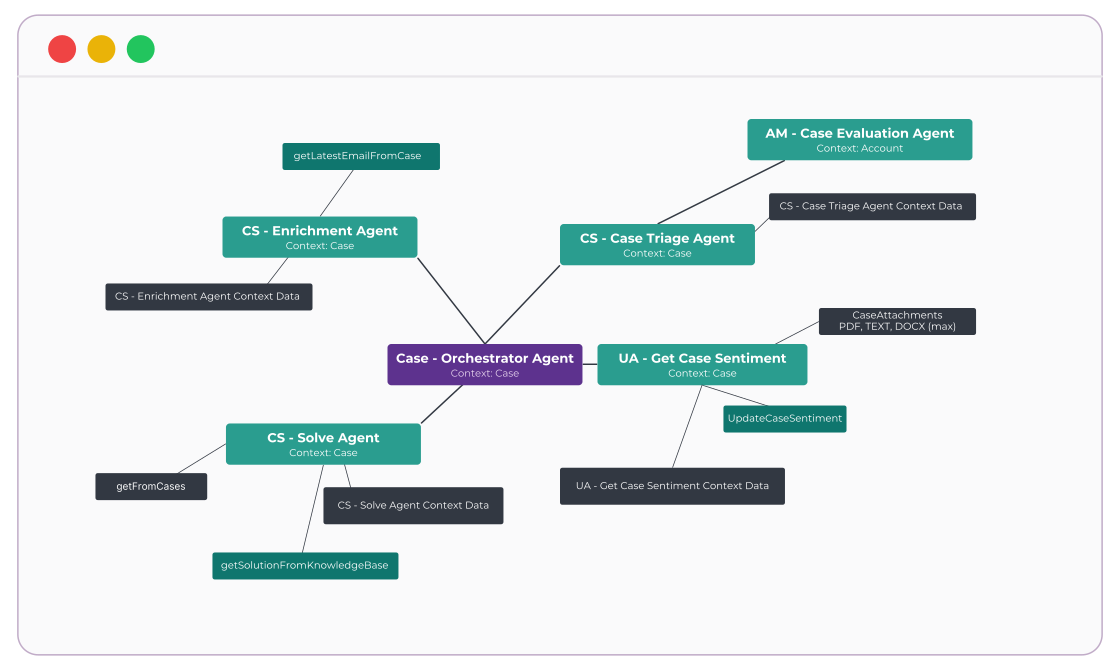
Ortoo Orchestrator captures every channel into one intake model inside Salesforce. AI reads the unstructured content, deterministic logic standardises and matches each record, and nothing waits in a shared inbox.
Inbound content from any channel becomes a structured Salesforce record at intake. Fields populated from the source. No manual logging. No copy-and-paste from inbox to case.
What changes day to day.
Records arrive structured, not raw.
Every channel becomes a clean Salesforce record on arrival.
Junk never reaches live queues.
Classification filters it at the door.
Attachments stop hiding information.
Document understanding reads them at intake.
The right account is matched automatically.
Resolved from any signal in the message.
Routing starts from good data.
The downstream workflow works because intake works.
Cost stays predictable.
You pay for work completed, not the steps required to complete it.
Salesforce-native. Every intake decision logged.
Ortoo Orchestrator runs natively in Salesforce. Workflow definitions, state, policy, permissions, and the audit trail live on the Salesforce data and security model, so there is no second system of record. Inbound content becomes a record on any standard or custom object, and every extraction, classification, and account match is logged on that record.
When intake needs an external system or an AI model, it is called as a governed step: you bring your own model and API key, and the call is logged against the record.
Coordination layer
Ortoo Orchestrator
Salesforce
Objects (standard and custom), Email-to-Case, Flows, queues, security model
External stack
Email servers, web forms, chat and portal platforms, document stores, AI providers
AI reads the messy part. Deterministic logic does the rest.
Intake is where content arrives unstructured: free-text email, attachments, varied formats, multiple languages. That is where AI earns its place, reading what the content is, what it contains, and which account it belongs to. Once the record is structured, deterministic logic takes over: routing rules, deduplication, and the handoff to the workflow.
Specialised agents own defined stages such as reading, classification, and account matching, while deterministic logic governs what each agent may decide and when it must escalate. AI runs only where the operations team has configured it, not as a default applied to everything, and every AI decision is logged on the Salesforce record.
Extract the structured fields from this inbound message and attach them to the record.
Ortoo Orchestrator supports any LLM provider.
Intake in action: Cars.com
Cars.com's Dealer Inspire division receives 14,000+ cases monthly from dealers and OEM partners. Account information arrived buried in email signatures. URLs varied across dealer websites. 25 senior agents were spending 60% of their time on manual triage. The failure was not in the routing logic. It was in the intake.
The challenge
- Account identifiers buried in URLs that varied in format from dealer to dealer
- Email signatures contaminating extraction. Boilerplate text misread as account context
- Multi-dealer emails arriving as single messages, requiring automatic case splitting with parent-child relationships
- 25 senior agents spending 2,800 hours monthly on manual intake work
The impact
- 33,600 annual hours reclaimed. 16 FTE equivalents released from administrative intake
- Near 100% first-touch routing accuracy across 6 production use cases. Routing only worked once intake worked
- Subscription cancellation processing reduced from hours to minutes
- Operations managers configure intake rules without IT involvement
Three operations. Three intake channels. The same orchestration model handling all of them.
Verivox
Consumer lead intake at scale. Workflow-driven distribution replacing consultant self-selection, scaled from 3 to 60+ consultants.
Read the case studyByMyCar
Multi-source dealer lead intake. Up to 100 Salesforce fields auto-populated in one step before assignment fires.
Read the case studyOppFi
Loan application intake routed through custom logic that keeps queues balanced and credit decisions moving without manual triage.
Read the case studyRelated pages
Service workflow orchestration
Case workflows that run after intake.
Read moreRevenue workflow orchestration
Lead and opportunity workflows that run after intake.
Read moreCustom workflow orchestration
Bespoke workflows that depend on structured intake.
Read moreEmail-to-anything
Email intake into any Salesforce object.
Read moreSalesforce Email-to-Case with AI triage
AI-driven case intake on top of native Email-to-Case.
Read moreEmail-to-lead in Salesforce
Turn inbound email into structured leads on arrival.
Read moreCommon questions from operations leaders.
What is intake automation in Salesforce?
Intake automation is turning inbound work into structured Salesforce records automatically, so a person does not have to read each message and create the record by hand. Native tools like Web-to-Case cover one channel into one object. Ortoo Orchestrator covers email, web forms, chat, portal submissions, and attachments into any object, and classifies, enriches, and account-matches each record on arrival. Email-to-Anything is the email intake engine inside it.
How is this different from native Salesforce Email-to-Case?
Email-to-Case captures email into the Case object and stops there. Intake orchestration captures email, web forms, chat, portal submissions, and attachments, creates records on any standard or custom object, and classifies, enriches, and account-matches each one on arrival. Email-to-Anything is the email intake engine inside it; the same model covers every other channel.
Does this work for channels other than email?
Yes. Email, web forms, chat, portal, and attachments are all captured into one intake model, each with its own rules. Threads stay intact, and replies route back to the originating record.
Which Salesforce objects can it create records on?
Any standard or custom object: Case, Lead, Opportunity, Work Order, and custom objects such as Patient, Claim, or Application. Native intake tools are limited to a single object; this is not.
How is AI governed, and can we use our own model?
AI runs only at the intake steps the operations team configures, classification, extraction, account matching, document understanding. Deterministic logic handles routing and decisions. Every AI decision is logged on the record, and Ortoo Orchestrator supports any LLM provider through your own API key.
How does account matching work when the content is messy?
Account matching resolves the right Salesforce record from any signal in the message, a URL in a signature, a domain in the cc list, a name in the subject line, not just structured fields. When a match cannot be made confidently, the record is flagged for review rather than guessed.
Does this replace our current intake setup?
No. It runs on top of what you already have. Existing channels, Email-to-Case, Flows, and routing rules continue to operate; intake orchestration standardises what reaches them. Start with one channel, expand as the team is ready.
How is the audit trail handled?
Every intake decision, extraction, classification, account match, and routing handoff, is logged on the Salesforce record. The audit trail lives where compliance teams already look for it, with no separate store.
Where is impact typically seen first?
In the channel that creates the most rework: the shared inbox, the form that generates junk records, or the attachments nobody reads. Teams usually have one intake channel running within days.
How is this priced?
You pay for work completed, not the steps required to complete it. For specifics, the commercial team can walk through it.
Why isn't Web-to-Case or Flow enough for intake?
Web-to-Case captures web forms into cases, a specific job it does well. Intake orchestration adds the channels it does not cover and the classification, enrichment, and matching that turn any inbound channel into a workflow-ready record on the right object, then coordinates the follow-on process.
Fix the intake. The rest of the workflow gets easier.
Book a 30-minute session. Bring the channel that creates the most rework: the shared inbox, the form that generates junk, the attachments nobody reads. We will walk through how it lands today and where intake orchestration changes the picture.
Installs natively into Salesforce. Start with one channel, expand as the team is ready. You pay for work completed, not the steps required to complete it.