Role
The agent's defined purpose and decision logic. Triage, routing, resolution, enrichment, classification, supervision. The role fixes which stage of the workflow this agent owns and what success looks like there.
Specialist workflow agents for Salesforce
Ortoo Orchestrator coordinates specialist agents, each owning a stage of the workflow. Bounded behaviour. Observable decisions. End to end, inside Salesforce.
Specialist agent design
Specialist agents on Ortoo Orchestrator replace opaque, brittle generalists with bounded units of execution, designed for production safety.
Each specialist owns one role, one set of tools, and one body of knowledge. It reads context, decides within scope, and hands off.
Splitting work across specialists makes orchestration traceable and recoverable. Not a chatbot, but verifiable execution logic.
We avoid the fragility of a single agent reasoning through an entire workflow in one prompt. Specialisation keeps behaviour consistent at scale.
You define the role, the tools, and the data each agent can touch. AI runs inside the guardrails your team sets.
One brain attempting everything
A sequence of specialists
Hybrid execution
Every agent step uses the right mechanism for the job. AI handles interpretation. Deterministic logic handles certainty. Human review handles judgment. Mix the three per step. Run agents with no AI at all, or apply AI selectively where interpretation adds real value.
See how Ortoo Orchestrator works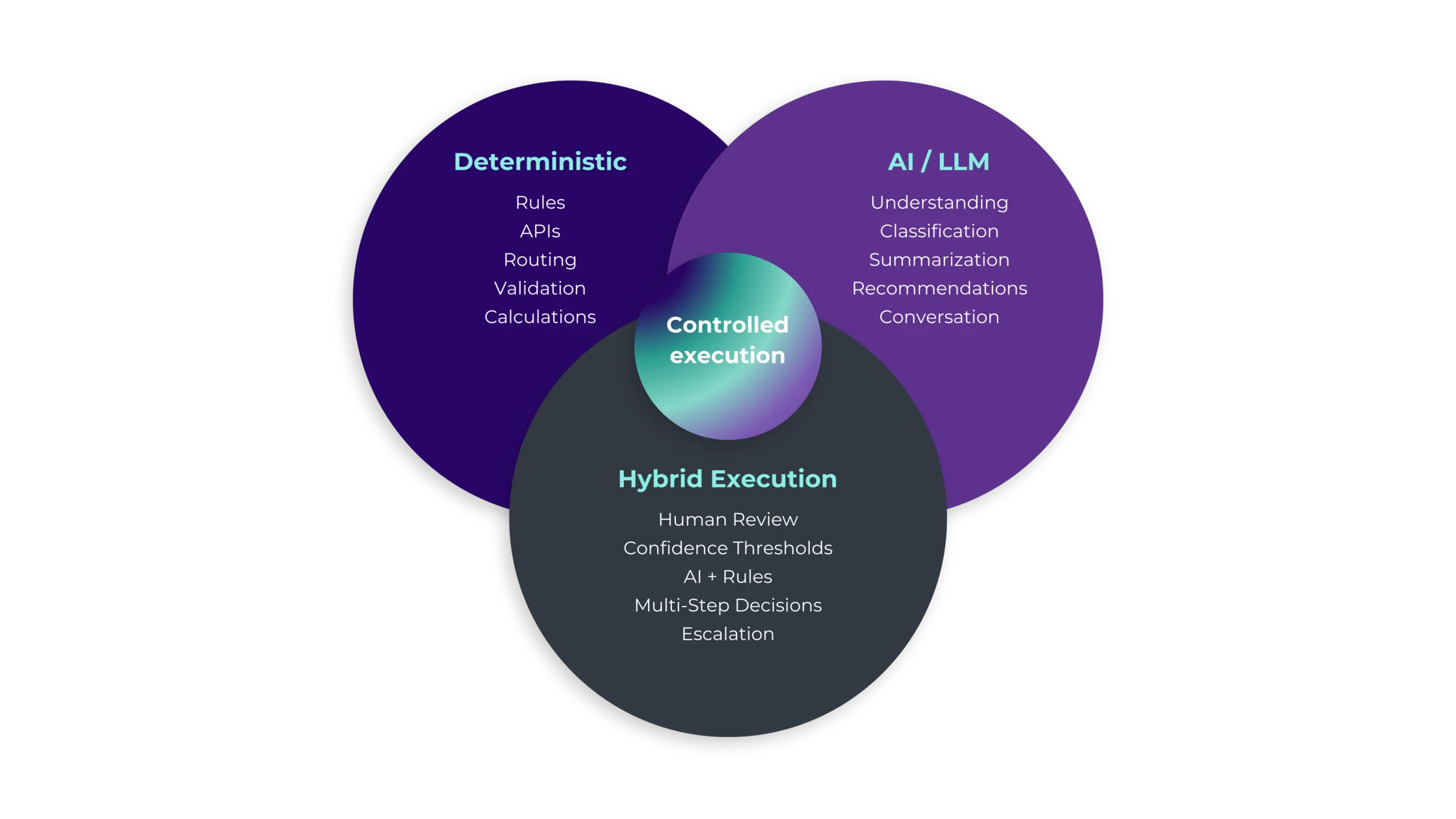
Agent anatomy
Every Ortoo agent is built from the same components. Configured once, reused across every workflow that needs it. Governed by IT, observable in production. The anatomy is consistent. The behaviour of each agent depends on how you configure it.
The agent's defined purpose and decision logic. Triage, routing, resolution, enrichment, classification, supervision. The role fixes which stage of the workflow this agent owns and what success looks like there.
The Salesforce data the agent reads at runtime: account history, case content, related records, structured fields. Scoped per agent. The agent sees what its role needs, nothing more.
Grounded reference material the agent draws from: product docs, policy guides, FAQ libraries, internal manuals. Retrieval is structured, not free-form. The agent uses sources, not speculation.
Configured limits on the agent's behaviour: confidence thresholds, escalation rules, approval gates, exception handlers. Part of the agent definition, not added after the fact. They cannot be changed at runtime.
The specific actions the agent can take: read fields, update records, call APIs, post to channels, trigger workflows. Configured per agent. Tools outside the configuration cannot be reached at runtime.
Every agent returns typed fields against a defined schema: category, priority, confidence, recommended action, response draft. Validated before the next step acts on it. No free text into operational workflows.
What persists across runs: prior decisions, context from earlier steps in the same workflow, recent interaction history where relevant. Scoped per agent and per workflow. No uncontrolled state.
The agent's defined purpose and decision logic. Triage, routing, resolution, enrichment, classification, supervision. The role fixes which stage of the workflow this agent owns and what success looks like there.
The Salesforce data the agent reads at runtime: account history, case content, related records, structured fields. Scoped per agent. The agent sees what its role needs, nothing more.
Grounded reference material the agent draws from: product docs, policy guides, FAQ libraries, internal manuals. Retrieval is structured, not free-form. The agent uses sources, not speculation.
Configured limits on the agent's behaviour: confidence thresholds, escalation rules, approval gates, exception handlers. Part of the agent definition, not added after the fact. They cannot be changed at runtime.
The specific actions the agent can take: read fields, update records, call APIs, post to channels, trigger workflows. Configured per agent. Tools outside the configuration cannot be reached at runtime.
Every agent returns typed fields against a defined schema: category, priority, confidence, recommended action, response draft. Validated before the next step acts on it. No free text into operational workflows.
What persists across runs: prior decisions, context from earlier steps in the same workflow, recent interaction history where relevant. Scoped per agent and per workflow. No uncontrolled state.
Agent collaboration
Agents do not improvise. Workflows define which agent runs first, what it produces, and which agent picks up next. A supervisor agent can coordinate exceptions. Context passes between agents at every handoff, structured and validated.
Context passes between agents at every handoff.
Why orchestrated agents
A standalone agent answers a prompt. An orchestrated agent does operational work. The difference is the system around it.
Answers prompts in isolation
What is missing:
Useful for one-off tasks. Not enough to run work end to end.
Specialists that execute work
enrichment, triage, routing, resolution
What you get:
A standalone agent is a feature. An orchestrated agent is operational infrastructure.
Your starting point
Most teams considering adopting AI agents are weighing three paths. Native Salesforce tools. A DIY build on Flow, Apex, and direct LLM calls. Ortoo Orchestrator as the execution layer. Each has trade-offs. The honest summary is below.
Agentforce + Flow + Apex
Best for: conversational AI and copilot patterns. Not built for multi-agent operational orchestration.
Flow, Apex, direct LLM calls
Best for: teams with deep engineering capacity and tolerance for owning AI governance internally.
Configured agents, orchestrated by Ortoo
Best for: operations teams running real workflows who need governed agentic AI without the build cost.
Governance
Governance is not a wrapper around agents. It is part of the agent's anatomy. Configured per agent, enforced, audited per run.
Each agent operates inside the role you define, under your Salesforce permission model. What the agent cannot do is as explicit as what it can. Limits are structural, enforced by Salesforce.
Every agent returns typed fields against a defined schema. Validated before the next step acts on it. Schema mismatches stop the workflow at validation, not in production.
Set the threshold per agent. Below it, the workflow drafts for human review or escalates. Above it, the agent acts and the decision is logged.
Every agent run is logged: trigger, context, decision, action, confidence. Audit trails are queryable and exportable.
Adoption
Most enterprises are stuck between AI experimentation and AI in operations. Tools are deployed, agents run pilots, results look promising. Then production reality hits: unpredictable outputs, no audit trail across tools, cost sprawling across agent actions and tokens. Ortoo Orchestrator is the bridge from experimentation to scaled operations, with governance configured from day one.
Stage 1
Where most teams are now. You have AI tools deployed: Copilot, Agentforce, ad-hoc prompts. They generate text, answer questions, demo well. They do not run operational workflows. No central control. No audit trail across them. Each tool sits in its own silo.
Stage 2
Where many teams get stuck. AI agents start performing tasks: classification, triage, enrichment. Real work, real volume. But execution becomes unpredictable as AI, automation, routing, and integrations interact. One bad output cascades. Cost surfaces in invoices, not in workflows. The team owning the platform spends more time stabilising than expanding.
Stage 3
Where Ortoo Orchestrator takes you. AI runs as governed operational infrastructure. Specialist agents handle their stage. Every decision is logged. Cost is tracked per workflow, capped per agent. Governance is configured once and enforced. New agents are added without rebuilding the foundation. The team controls the system, not the other way around.
You start with one agent. You expand incrementally. The governance scales with you.
Agent types
Ortoo ships proven agent patterns across service, revenue, and industry workflows. All fully configurable and customisable.
Explore custom agentsAdds missing context. Looks up account history, pulls external data, populates structured fields on the record.
See it in productionReads incoming work and identifies what it is. Account, intent, urgency, language, attachments, eligibility.
See it in productionAssigns category, type, priority, and tags. Turns unstructured content into structured fields the rest of the workflow can act on.
See it in productionSends work to the right queue, team, or owner. Considers workload, capacity, skills, language, and SLA risk.
See it in productionDrafts responses, updates records, completes the workflow step. Handles the work or hands off for human review.
See it in productionOversees workflow progression. Handles exceptions, escalates blockers, ensures each step completes within policy.
See it in productionConfigure your own agent for any operational task. No code. Same anatomy, same governance, same observability.
Explore customThe lifecycle
Agents are built through configuration, executed by the orchestration engine, and operated with full visibility. The same lifecycle governs every agent your team ships.
Step 1
Configure the agent's anatomy. Role, context, tools, knowledge, structured output, boundaries, memory. No code. Operations teams build through the configuration layer.
Step 2
The orchestration engine runs the agent. Coordinates handoffs. Manages context passing. Applies confidence thresholds. Logs every decision. Workflows compose from agents the same way agents compose from tools.
Step 3
Monitor agent runs, decisions, and costs. Adjust thresholds. Add new versions. Roll back changes. Ortoo handles the operational concerns. The team focuses on the workflow.
The numbers
Assent runs 16 distinct use cases across 16 teams using specialist agents. One configuration model. One governance framework. Different agents handle compliance enrichment, supplier triage, and request classification. Sixteen teams. One system. In production: near-100% routing across 5 languages and 15 of 16 critical workflows at Assent Compliance.
Cars.com used to spend 60% of senior agent time on manual case triage. Specialist agents now handle triage and classification automatically. Senior agents focus on resolution. Annual capacity reclaimed: 33,600 hours.
Common questions
Agentforce agents are conversational and assistive: chat patterns, single-task help, copilot-style interaction with users. Specialist agents are operational: bounded role, structured output, observable decisions, composable into multi-step workflows that run in the background. The two patterns serve different jobs.
See the full Agentforce comparisonNo. Each agent calls the LLM provider you choose, through your own API key, under your contract with the provider. Model selection is per-agent. Different agents can use different models. Switch providers without rebuilding workflows. The orchestration layer stays the same when your AI choices change.
You set the confidence threshold per agent. Below the threshold, the workflow does not act on the agent's output. It drafts for human review, asks for clarification, or escalates to the path you configured. Above the threshold, the agent acts and the decision is logged for audit. Bad calls are caught at the agent boundary, not after they have cascaded.
Most production workflows compose from three to six agents, plus a supervisor agent coordinating exceptions. Assent runs sixteen distinct use cases across sixteen teams using the same configuration model. Agents are managed at the system layer, not as individual integrations. Adding the seventh agent costs the same effort as adding the second.
The agent itself runs natively on the Salesforce platform. It inherits Salesforce permissions, sharing rules, and field-level security. When the agent needs interpretation, the LLM provider you configured gets called through your own API key, under your contract with that provider. No external infrastructure to provision. No data movement outside the trust boundaries you control.
Every agent is versioned. New versions can be tested in sandbox against real workflow data before production. Rollback is supported. Changes do not require code deploys. The same lifecycle governs every agent change you ship.
Some teams do. The trade-off is total cost of ownership, time to first agent in production, and the governance you have to build from scratch. The detailed comparison covers what your engineering team gets back when the lifecycle is configured rather than coded.
See the DIY comparisonSalesforce admins. Operations teams. Anyone who can configure a Flow or a routing rule. No Apex, no Java, no custom AI engineering required. The configuration layer is built for the people closest to the work.
Three structural controls. Grounded retrieval: the agent draws from your knowledge sources (product docs, policy guides, FAQ libraries) rather than free-form generation. Structured output: every agent returns typed fields against a defined schema, validated before the next step acts on it. Confidence thresholds: below your configured threshold, the output does not flow downstream. Hallucinations are caught by the architecture, not the agent.
Further reading
Execution deep-dive
The full system model. Execution architecture. Hybrid AI and deterministic logic. Native to Salesforce.
Read the deep-diveCompare
The case for buying instead of building. Total cost of ownership, time to first workflow, and what your engineering team gets back.
See the DIY comparisonAgentforce comparison
What each is built for. How they complement each other. When to use each pattern.
Read the comparisonStart with one workflow. Validate it. Expand across service, revenue, and operations as you go.