Calling Salesforce is easy. Defining what happens next is the hard part.

The gap between capability and reality
Most mature enterprise Salesforce environments are well equipped to handle a plethora of operations. They can route work, run flows, trigger integrations, and now let agents take action autonomously.
Somehow, teams still spend time fixing cases, reassigning leads, and investigating whether things were handled correctly.
According to our survey at Agentforce World Tour New York 2026, 78% of Salesforce customers still manually fix or reassign work after routing.
Why workflows break over time
In the previous articles, we looked at why workflows break in Salesforce. Work isn’t consistently understood at intake, routing depends on that, and over time fixes spread logic across flows, rules, and integrations.
So even when everything is “working,” outcomes aren’t consistent. There’s a lot of fragmentation and disconnect.
The real issue: no defined workflow
It’s clear that most Salesforce environments don’t lack automation. They have flows, routing, integrations, and agents. The problem is that none of these follow a single, clearly defined workflow.
Each part reacts to the same case or lead, but there’s no one place that defines what should happen from start to finish. So outcomes depend on timing, sequence, and how different pieces interact in that moment.
What needs to change, and what this looks like in practice
The fix is defining the workflow itself properly. That means deciding, upfront, how work should move from intake to resolution, and making that explicit.
A simple example: A customer emails support about a billing issue.
In most setups, that email is interpreted, categorized, routed, enriched, and updated by different parts of the system. If something is slightly off (think missing data, wrong classification, timing), routing changes, priority updates late, or the case gets reassigned.
Now take the same scenario with an end-to-end defined and orchestrated workflow.
The request is interpreted once. It’s identified as billing, marked as urgent, assigned to the right team, and moves through the next steps in order. If a check or action is needed, it happens at the right stage.
Same systems. Same data. The difference is that when the case handling is defined in one place instead of fragmented all over the tools, the outcome is consistent and the overall process is much easier to manage – even by the operational team.
How execution changes: simpler and more governed
Once the workflow is defined, everything else follows it. This is what agentic orchestration solution like Ortoo Orchestrator is designed for.
Flows don’t make independent updates. Routing doesn’t depend on partial data. Agents don’t over interpret and act in isolation. They execute within the workflow, with more precision.
Each step is executed by a specialized back-end agent with a clear role.
These agents don’t act independently. They execute within a defined workflow, with clear boundaries and responsibilities.
Work moves from one step to the next based on clear definitions.
Some steps use rules, some use AI, but only where it’s actually needed, and fully under your control. You decide where AI is used, which models are used, and where deterministic logic is required. That keeps execution predictable and avoids unnecessary AI usage and cost.
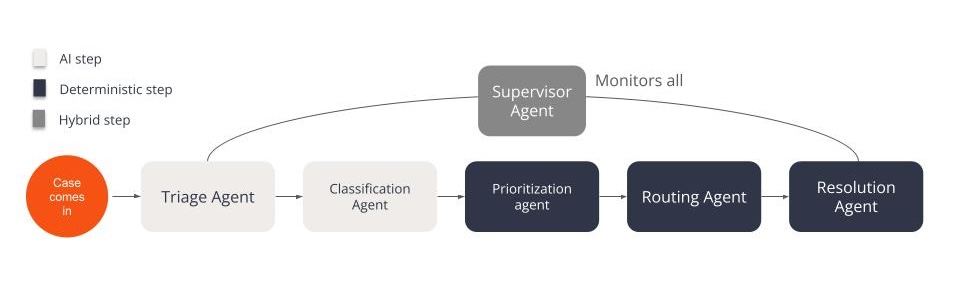
You can use AI where it adds value, without worrying about uncontrolled usage or unpredictable scaling.
Cost follows the same logic. Execution is priced per work item, for example per case, lead, or request, not per model call or token. That means cost is tied to the outcome being delivered, not how many AI decisions happen along the way.
Execution isn’t limited to Salesforce objects. You can orchestrate workflows from one place across:
- core Salesforce functionality
- ISV apps
- external systems like ERP or billing platforms
- and external agents
There’s no need to monitor queues like hawks, or correct assignments after the fact. The workflow already controls how work should be handled. This is a very different level of predictability than the majority of agentic AI solutions in the market.
When it comes to governance, every step is visible and traceable. You can see how decisions were made, what actions were taken, and why. This creates a full audit trail across the entire workflow, not just individual components.
And when something needs to change, you configure the workflow itself. There’s no need to jump across a mix of flows, rules, and integrations spread across the system.
All of this runs natively in Salesforce. Data doesn’t need to move outside the platform, and existing objects, automations, and integrations remain in place.
Ops teams can update and configure the workflows easily independently, so there’s no IT and dev sprints slowing down.
Why this matters now
This matters more now than it used to.
As more work is handled by AI agents, the system needs to execute exactly as it’s defined. If that definition is spread across multiple places, the inconsistency becomes “part of the system”.
Defining the workflow in one place removes that dependency. With Ortoo, the level of control over the operational workflow execution levels up big time. You gain control over how workflows execute, where AI is used, and how cost scales.
AI becomes a controlled value-adding part of the workflow.
If you’re moving away from legacy workflow management, or simply want to improve operational execution across your Salesforce workflows, let’s talk.
Related insights
How to improve Salesforce case deflection rates
Deflection only solves half the problem. The cases that do not deflect are the ones that breach SLA. How to improve deflection rates, and how to handle what is left.

Salesforce Headless 360 doesn't fix broken workflows, it exposes them.
Salesforce’s shift to Agentforce and Headless 360 makes everything callable. Without control over how work executes end to end, it simply exposes the same fragmented workflows and scales their inconsistencies.

The Root Cause of Salesforce Workflow Problems is Often Triage – Not Routing
AI and Agentforce can speed up triage by interpreting requests, but without a clear way to translate that understanding into consistent action, faster classification still leads to inconsistent outcomes.
READY TO SEE IT IN ACTION
Map your workflows with our team.
30 minutes, no prep needed. We will map one workflow you handle today and identify where orchestration would change the outcome.