AI pricing should be simple to understand and granular to control

AI is getting easier to buy and harder to cost. Agentforce editions are the latest example. The right pricing structure depends on how AI is used, and on whether buyers can see, understand and control that use.
AI pricing is a moving target. Model providers such as Anthropic and OpenAI price input and output differently, discount cached or batched requests, and change the economics with every model generation. Software vendors add their own layer on top: seats, credits, conversations, outcomes. Even when every rate is published, the structure is hard to follow and harder to forecast. And it's often unclear which parts of the spend you control, beyond a usage cap.
Salesforce's new Core, Advanced and Max editions are the latest and most visible example in the Salesforce ecosystem. They come up in a lot of customer conversations right now. They make AI easier to buy. Costing it is a separate job.
Two decisions come before the packaging: how AI should be used in your operations, and which pricing structure fits that use.
Packaging got simpler. Pricing kept its layers.
The editions cut the number of things you buy. Underneath, Salesforce's Agentforce pricing page still lists separate meters, each measuring something different.
| Unit | What it measures | List price |
|---|---|---|
| Seat | Access for one person | $195, $395 or $550 per user per month |
| Standard action | One step an agent performs | 20 Flex Credits, or $0.10 |
| Conversation | One customer conversation | $2 |
| Help Agent resolution | One qualifying resolved request | $2 |
| Data 360 consumption | Data processing behind the agent | Priced separately |
Salesforce's own worked examples leave out Data 360 and other consumption services, so an action count is never the full cost. And Flex Credits and conversations aren't supported in the same org, so the model you start on decides the one you stay on.
None of this is unusual. It's what AI pricing looks like across the market right now.
Different kinds of AI work need different pricing
AI does several different jobs in an organisation, and each one creates value in a different place.
| Kind of AI work | Where the value shows up | How volume behaves | Control it needs | Pricing that fits |
|---|---|---|---|---|
| Internal assistants | Per person, spread across the day | Hard to predict per person, low risk per request | Guardrails and data access | Per seat, often unmetered |
| Customer-facing agents | Per conversation at the front, per completed task behind it | Follows customer demand | What happens after the chat ends | Per conversation or outcome at the front |
| Operational execution | Per completed task | High and steady, follows work volume | Granular, step by step | Per task or work item |
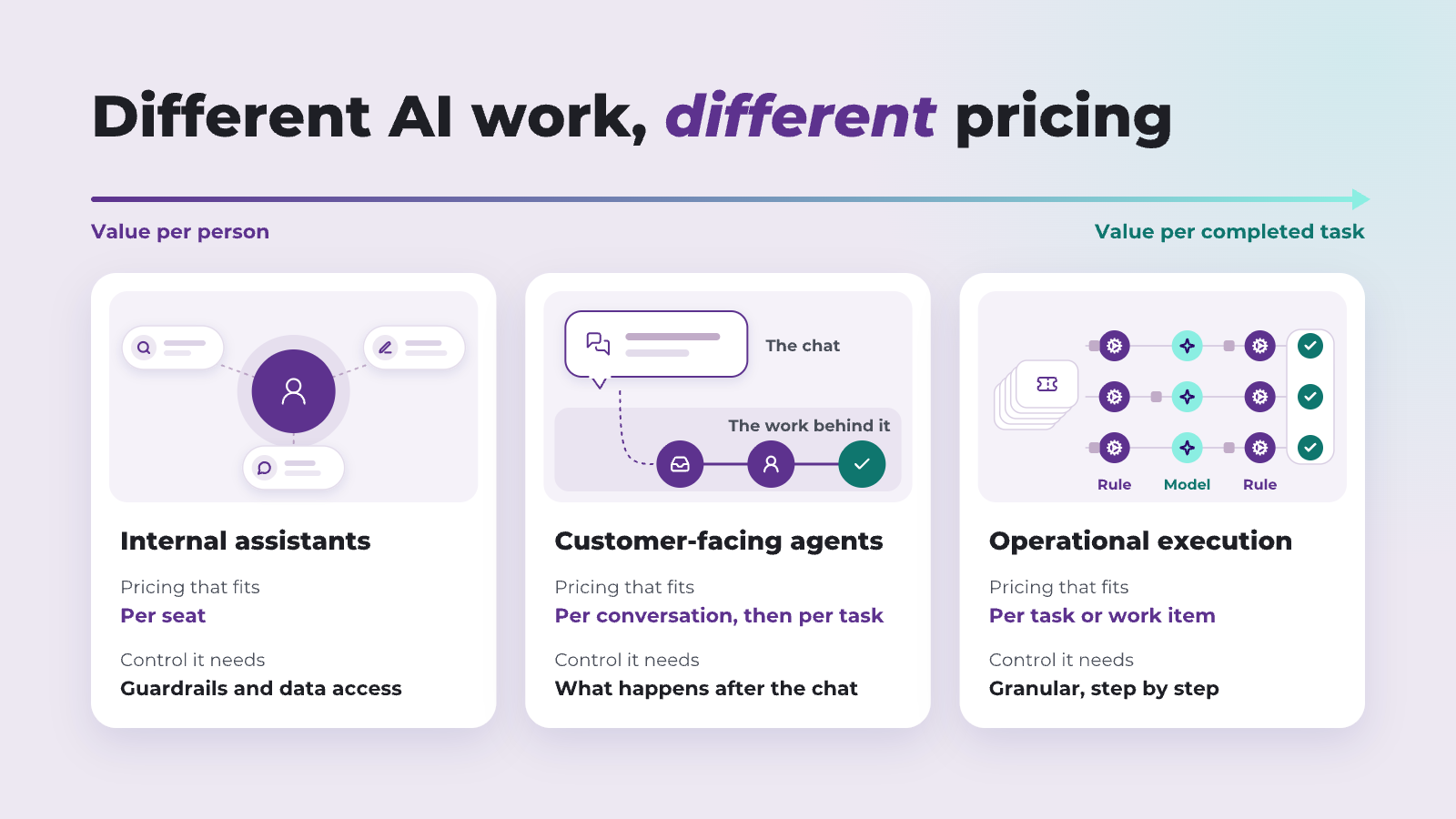
Per-person value suits per-person pricing. Per-task value suits per-task pricing.
An internal assistant answers questions, drafts and searches. One person's usage is hard to predict, but each request is low risk, and the value sits with the person using it. A seat, often unmetered, fits that well.
An operational execution agent is different. It classifies, enriches, routes and updates records, thousands of times a month, inside processes the business depends on. At that volume, small design choices multiply. You need granular control: which steps use a model at all, which model, what each process may consume, and where a person approves.
Customer-facing agents sit across both. The chat is the visible part. The work happens after it: the case that gets created, the specialist who picks it up, the refund that gets processed, the follow-up that gets sent. Pricing per conversation measures the front door. The back end is operational execution, and it needs the same granular control.
Seats scale with people. Credits don't.
The Flex Credit allowance in each edition is set per org, per year, as SalesforceDevOps.net reported. Seats are priced per user. Add people and the seat bill grows. The credit pool stays where it is.
| Core | Advanced | Max | |
|---|---|---|---|
| Annual seat cost, 100 users | $234,000 | $474,000 | $660,000 |
| Included credits per year | 500,000 | 1,000,000 | 2,750,000 |
| Standard actions per year | 25,000 | 50,000 | 137,500 |
| Actions per user per working day | about 1 | about 2 | about 5.5 |
At 1,000 users, the seat cost multiplies by 10. The allowance doesn't move, so Core works out at about one standard action per user every 10 working days.
That structure suits assistant use well: a seat per person, with a shared pool for light agent activity. Operational volume needs its own forecast.
Illustrative, at published list prices, before discounts. Working days assumed at 250 a year. Confirm the allowance on your order form.
What one service queue consumes
Take a service team handling 2,000 cases a month, with an agent that triages, enriches and drafts on each one. Salesforce's own pricing examples use five standard actions for a multi-step request.
| Agent actions per case | Actions per year | Flex Credits | Cost at list | How long each allowance lasts (Core / Advanced / Max) |
|---|---|---|---|---|
| 5 | 120,000 | 2,400,000 | $12,000 | 2.5 months / 5 months / the full year |
| 12 | 288,000 | 5,760,000 | $28,800 | 1 month / 2 months / under 6 months |
Same team, same seats, same case volume. One design decision more than doubles the consumption line.
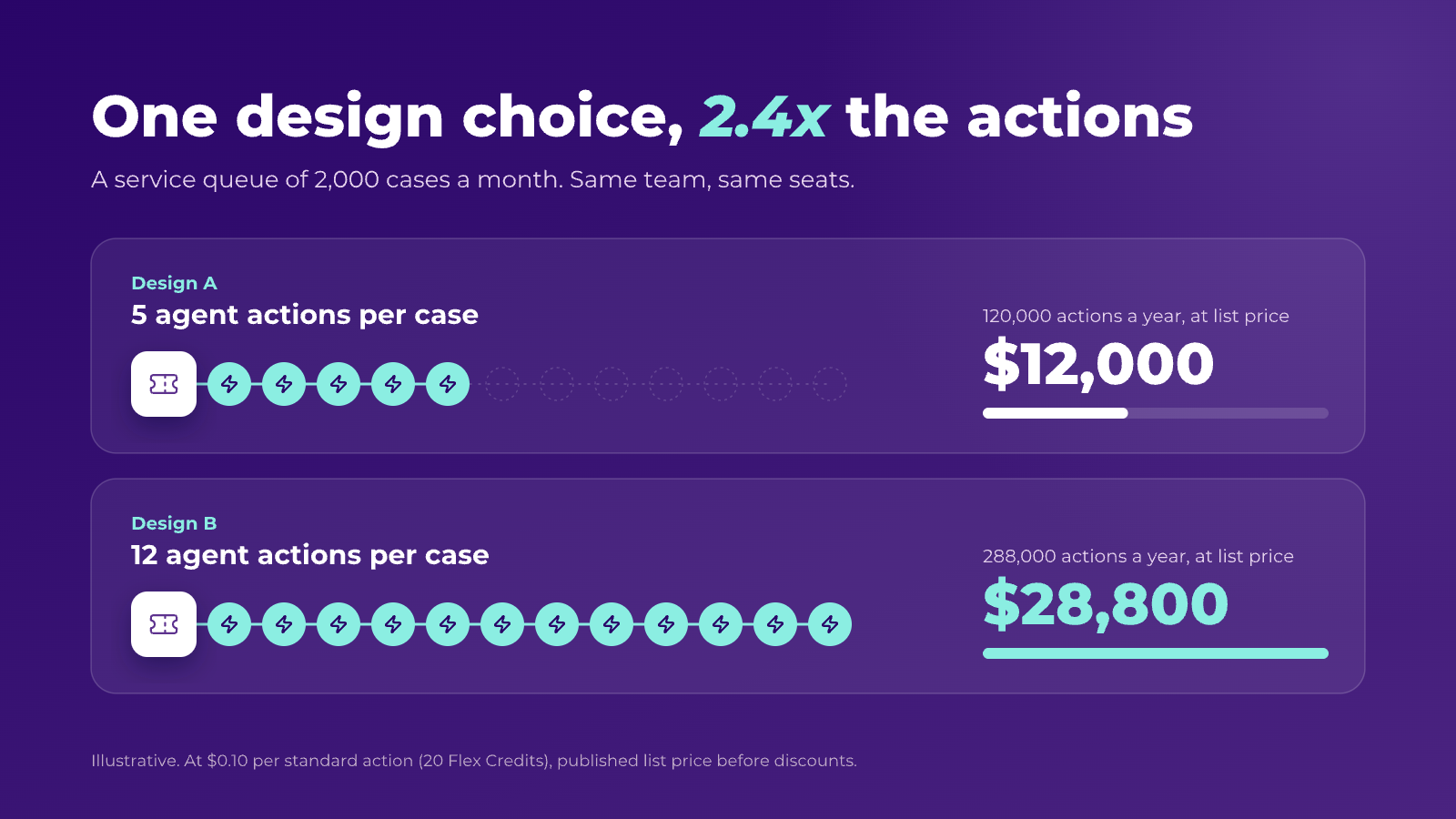
At this volume, consumption is still small next to the seat bill. The issue is predictability. A seat count is known the day the contract is signed. An action count depends on retries, multi-step requests, how often the agent hands back to a person, and which data services run underneath.
Simple to understand, granular to control
A bundle helps buyers only when they can see what they use, understand what drives it, and control it against how it should be used.
See it. Consumption per process, as it happens, in a view the people who own the process can read.
Understand it. What one completed task actually costs: the agent actions per resolved case, the data processing behind them, how often a person corrects the result, and how often a step is retried.
Control it. Against how each process should use AI, with more than a usage cap. A model only where judgement is needed. Rules everywhere else, because a step written as a rule doesn't need a model at all. Limits per process, and approvals where the risk is real.
Simplicity comes first. That means few meters, and a unit the buyer already recognises, such as a case or a lead. If the pricing structure is too complex for the buyer to follow, no amount of control will deliver the result they expected. The goal is a structure simple enough to understand and controls granular enough to match how each kind of AI is used.
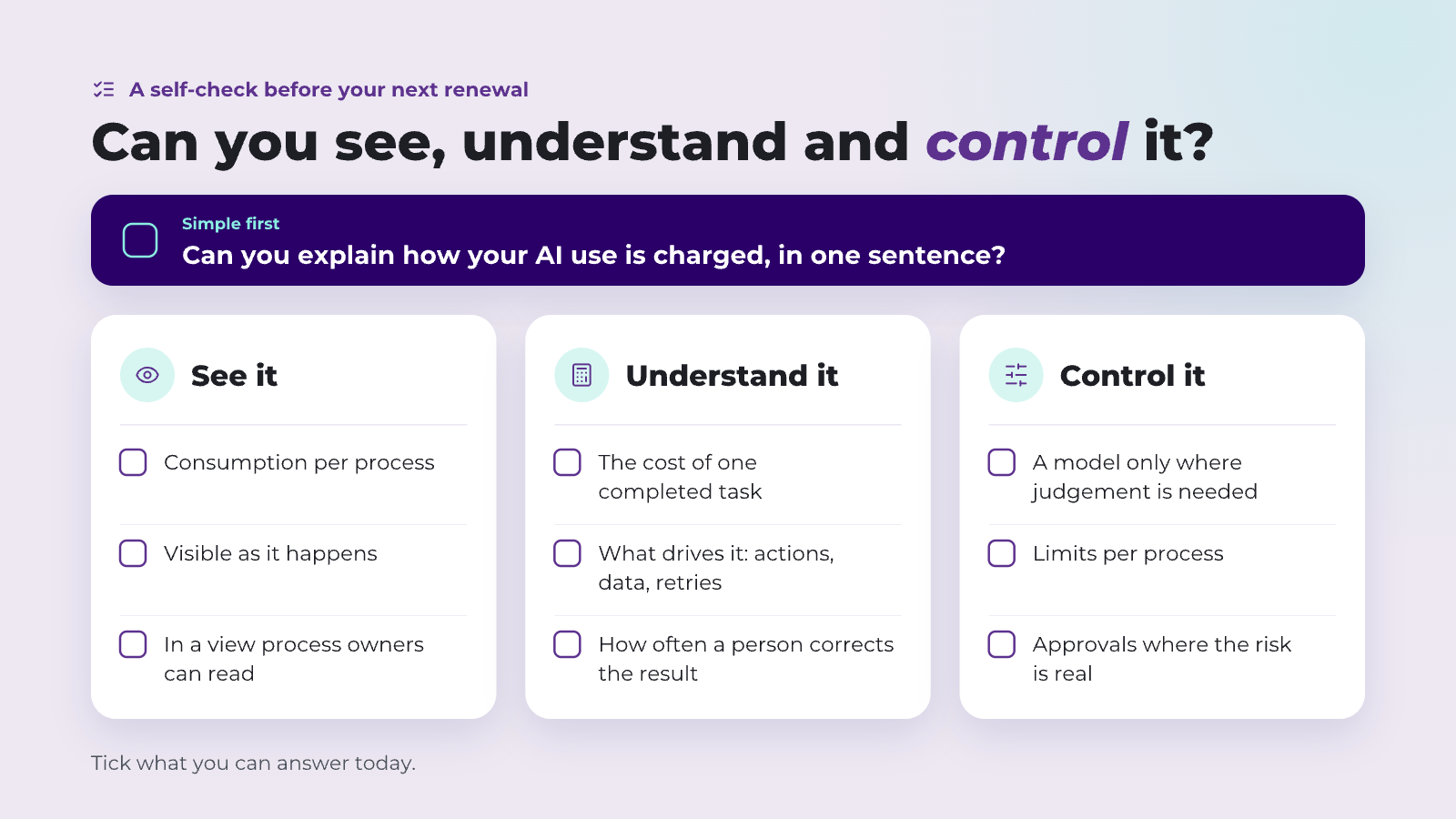
Questions to settle before the next renewal
- Which of your AI use is assistance, and which is operational execution?
- How many agent actions does one completed case or lead take today, and how sure are you of that number?
- Which steps genuinely need a model, and which could run as rules?
- Who sees consumption as it happens, and who's accountable when it runs ahead of plan?
- What sits outside the action count: data services, conversations, outcomes?
Where Ortoo fits
Ortoo's pricing is one take on this. Ortoo Orchestrator is priced per work item completed, such as a case, a lead or a request. Deterministic steps carry no AI cost. See Ortoo pricing.
It's built for the operational side: what happens after the chat. AI is applied to the steps that need judgement, deterministic logic handles the rest, and every step is recorded inside Salesforce, so the cost of a completed piece of work is something you can see.
For the edition-by-edition detail, see what is actually in Agentforce Core, Advanced and Max.
Sources
Checked on 19 October 2026. Prices are published US list prices before discounts.
- New Salesforce editions bundle everything businesses need for agentic transformation, Salesforce (3 September 2026)
- Agentforce pricing, Salesforce
- Sales Cloud is back on the price list, SalesforceDevOps.net (14 September 2026)
- Ortoo pricing
- Pricing, Anthropic (input and output token pricing, prompt caching and batch discounts)
- API pricing, OpenAI (input and output token pricing, cached input and batch discounts)
Related insights

Agentforce editions: what is actually in Core, Advanced and Max?
What Agentforce Core, Advanced and Max include, how far Flex Credits go, what changes at renewal, and why Workforce Engagement does not settle who gets each case.

Centralising Salesforce Routing Logic Without Fragile Code
Understand the limits of custom code and flows for routing and discover a more resilient, centralised model.

AI-Powered Round Robin Assignment in Salesforce
Discover how AI-powered round-robin Salesforce assignment drives efficiency for management of Leads, Cases, and more. This article explores the capabilities and limitations of Salesforce-native round-robin functionality and how AI can plug the gaps.
READY TO SEE IT IN ACTION
Map your workflows with our team.
30 minutes, no prep needed. We will map one workflow you handle today and identify where orchestration would change the outcome.